
Set Up a Research Pedestal and Give Players Research Scrolls
Placing the 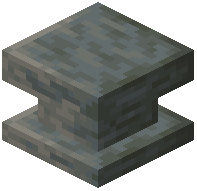 Research Pedestal
The Research Pedestal is the core block for unlocking stages in research mode. Place it in an accessible location where players will gather to unlock new eras. This block acts as the interaction point for your progression system.
Creating and Distributing Research Scrolls
Once you've created a stage in the stage editor, you need to give players a way to research it. Use the command:
`
/give @s historystages:research_scroll{StageResearch:"STAGE_NAME"}
`
Replace STAGE_NAME with the exact name of the stage you created. Players can then carry this scroll to the Research Pedestal and place it there to begin research.
Managing Research Time
When a scroll is placed on the pedestal, research begins and takes time to complete. During this period, the pedestal will show progress. Once research finishes, the stage unlocks for that player (or everyone, depending on your stage settings) and new items, blocks, or dimensions become accessible.
You can distribute scrolls through commands, creative mode, or by setting up custom loot tables if you want them to appear naturally in your world.