
Build Your First Flying Machine
Setting Up the 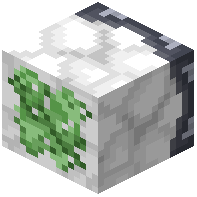 Floatater Block
Start by placing a Floatater Block in your chosen location. This block has a sticky side—make sure it faces the direction you want your machine to travel. The sticky face will be visually distinct from the other sides.
Attaching Blocks
Attach your building blocks directly to the sticky face of the Floatater Block. You can stack multiple blocks, create complex shapes, or build an entire structure. All connected blocks will move together as one flying machine. Blocks attached to non-sticky faces won't be captured.
Launching Your Machine
Once your structure is complete, send a redstone signal to the Floatater Block. You can use redstone dust, a lever, a button, or any other redstone power source. The machine will immediately launch into the air and travel in the direction the block faces.
Stopping Your Machine
Your machine will naturally stop when it hits a wall, mountain, or other solid obstacle. It will then lock in place as solid blocks. For more precise control, use the  Sticky Wand to freeze your machine mid-flight.