
Set Up Your First Mailbox
Creating a Mail Network Address
Mailboxes are the foundation of your postal system. To set one up, you'll need to place a 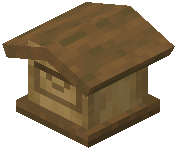 mailbox block near your base and assign it a unique address on the mail network.
Steps:
1. Place a mailbox block in an accessible location
2. Open the mailbox interface
3. Spend 3 experience levels to register it to the network
4. Your mailbox now has a unique address that other players can send mail to
Preparing for Deliveries
Once your mailbox is active, pigeons need seeds to motivate them to pick up outgoing mail. Keep seeds nearby—you can place them directly in the mailbox along with your letters or packages.
The mailbox front hatch will open when a pigeon arrives to collect mail. Pigeons spawn naturally in mountain areas and near villages, so they'll find your mailbox eventually. If you need to gather pigeons faster, hold seeds in your hand to attract them to your location, then lead them back to your mailbox area.
Make sure your mailbox has a clear path to the sky—pigeons fly high above clouds to deliver mail quickly across long distances.