TelePads Mod — Reference
Blocks
TelePad
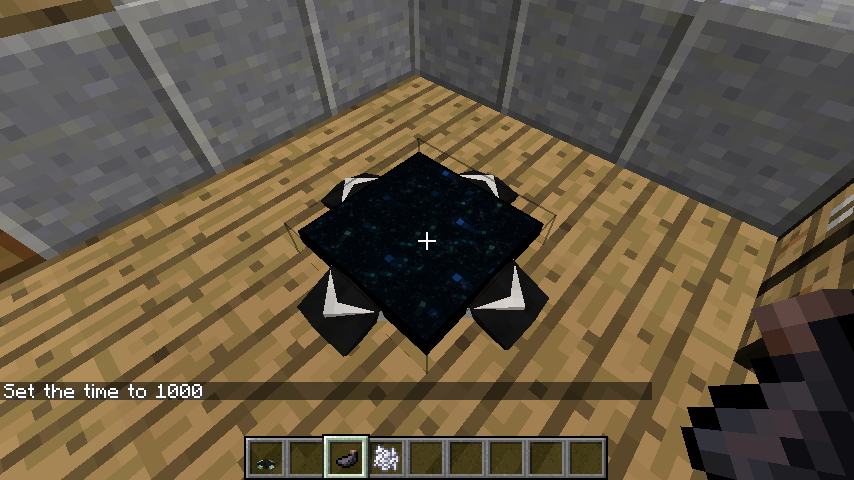
The TelePad is the central block of the mod. It is a pressure-sensitive platform that detects when a player stands on it.
- Placement: When placed, a GUI immediately appears prompting the player to name the pad. This name will appear in the teleportation menu for all connected pads.
- Interaction: Standing on the pad for a few seconds (the "charge" time) will trigger the teleportation overlay.
- Customization: The pad consists of two main parts: the base (feet) and the arrows. Both can be dyed independently.
- Removal: Breaking the pad will remove its entry from the global registry. If a pad is broken, other pads will no longer be able to teleport to that specific location until it is replaced and renamed.
Items
Transmitter Upgrade
The Transmitter Upgrade is an essential late-game item used to enhance a standard TelePad. By default, TelePads only work within the same dimension (e.g., Overworld to Overworld). Applying a Transmitter Upgrade allows the pad to send players across dimensions (e.g., from the Overworld to the Nether or the End).
- Usage: Right-click an existing TelePad with the Transmitter Upgrade to install it.
- Visual Change: The pad will often display a distinct particle effect or visual indicator once upgraded.
Dyes
Standard Minecraft dyes are used to personalize TelePads. * First Dye: Changes the color of the "feet" (the base corners) of the pad. * Second Dye: Changes the color of the arrows on the pad's surface. * Water Bucket: Right-clicking a colored TelePad with a Water Bucket will wash away the dye, returning it to its default gray state.
Recipes
The following recipes are standard for the 1.18.2 and 1.19.2 versions. Note that in older versions, recipes may have used different ingot configurations.
| Result | Ingredients | Pattern |
|---|---|---|
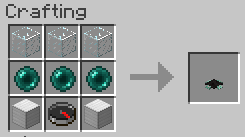
| TelePad | 3x Glass, 1x Compass, 2x Ender Pearl, 3x Iron Ingot | Glass (Top Row), Ender Pearl - Compass - Ender Pearl (Middle Row), Iron Ingots (Bottom Row) |
| Transmitter | 1x Eye of Ender, 4x Gold Ingot, 4x Redstone Dust | Eye of Ender (Center), Gold Ingots (Corners), Redstone (Sides) |
Admin Tools
Server administrators have access to commands to manage the TelePad network and prevent griefing or map issues.
/telepads list: Displays a list of all registered TelePads in the world with their coordinates and owners./telepads remove [name]: Forcefully removes a TelePad from the registry, useful if a pad was placed in an illegal area or by an inactive player.- Config Options: Admins can edit the
telepads-server.tomlfile to adjust the teleport delay, toggle whether the Transmitter Upgrade is required for dimensional travel, or change the crafting costs.