Main Screen
When you open the mod, you will see something like this:
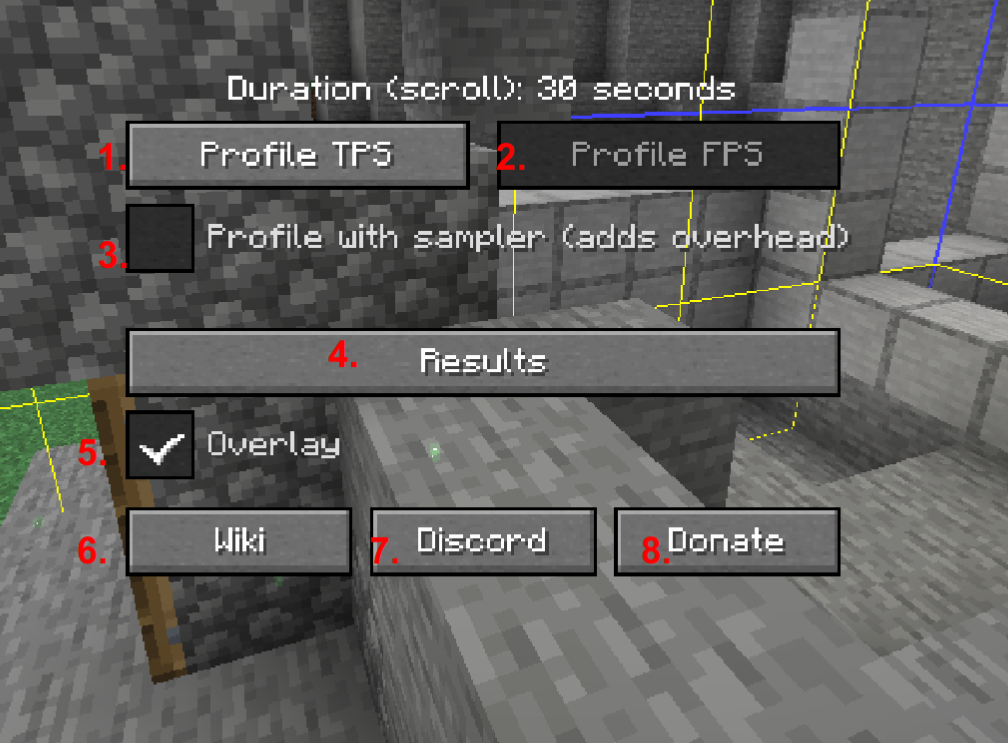
- Profile TPS - Start a TPS profiler for the displayed duration. (Note: you can change the profile duration from 5-60 seconds by scrolling anywhere in the window)
- Profile FPS - In the future, potentially, run a new FPS profiler for the displayed duration. Unfortunately, I'm still working out how to approach the feature (or if it would even be a good fit for the mod or just cause more issues), so I cannot provide an ETA as to when the feature will arrive
- Checkbox to run the profiler with a sampler that will give you a similar Stacktrace result as /spark profiler.
- Show the results of the TPS profiler
- Toggle the in-game overlay over blocks and entities
- Takes you here!
- Takes you here, where you can support the project.