X%E2%80%90Archived 1.18 Experimental Build (Deprecated)
Please see the Data Migration - 1.18 and later page.
I'm currently working on an experimental version of Lootr for 1.18.1 that stores data differently. I'm looking for people interested in testing this in both single-player and on servers.
This page contains information on how to back-up your current Lootr data to prevent any loss in your world, as well as instructions on how to ensure the experimental build is functioning properly.
I am extremely confident in its current functioning but I'd like some testing done before release.
The test build can be found linked at the end of this post.
- Please ensure that chests you have previously looted do not suddenly get new loot added to them.
- If you are using chests for storage, please ensure that such items still exist.
- Please ensure that any future chests you open do not create additional files in the
world/data(or equivalent) directory. These would be in the format ofLootr-chest-<dimension>-UUID,Lootr-entity-<uuid>andLootr-custom-<dimension>-<uuid>. (New directory structure should look like this: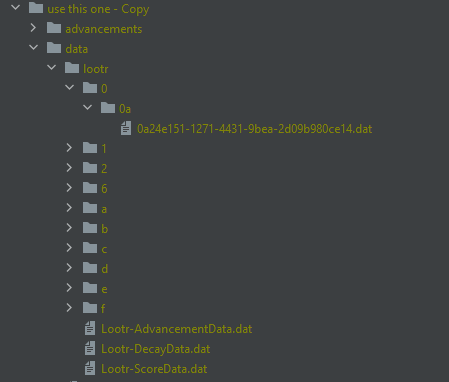 )
) - Ensure that the
/lootr clear <player>functions properly.
If any of these testing steps fail, or you experience a crash, please open an issue report with the following:
- A copy of your original back-up
world/data(or equivalent) folder (as a zip file) - A copy of your current, new
world/data(or equivalent) folder. - A copy of the
Lootr-migration.logfile. - Any crash reports, screenshots or other information that is relevant.
To revert, after having stopped your server/game:
- Delete the
world/data/lootrdirectory. - From your original
world/databack-up, copy all files beginning withLootr-into theworld/datafolder. - Remove 1.18-0.1.15.49 and replace with the most recently released version on CurseForge (0.1.14.48)
- Relaunch your server/single-player.
Please note that any inventories create since after testing the update will have regenerated their contents; this is not an issue and is to be expected when reverting to a back-up.
Please use the following build: lootr-1.18-0.1.15.49.